NVIDIA’s Chat RTX is a powerful generative AI tool that enhances AI interactions across operating systems. This guide streamlines the download and installation process, helping you quickly set up Chat RTX, a key part of NVIDIA’s AI Workbench. With advanced RTX technology and TensorRT-LLM integration, Chat RTX improves privacy, reduces latency, and optimizes performance. Perfect for AI enthusiasts and developers, this post covers the essential steps to get started with Chat RTX and elevate your AI-driven projects.
¿How to Install Chat RTX?
ChatRTX Installation Process:
Step 1: Download Chat RTX

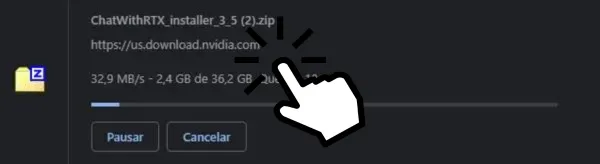
- Go to the NVIDIA website: Enter the ChatRTX section, and click the download button to download a 36.2 GB zipped folder.
Step 2: Decompress the Folder
- Create a folder on disk (C:): Decompress the downloaded folder into this newly created folder. (Important: The folder name should not contain spaces to avoid errors.)
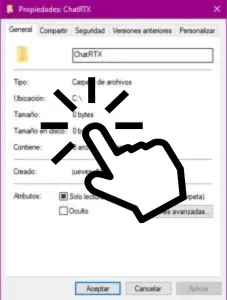
Step 3: Run the Installer


- Click on setup: After unzipping, click on setup to open the installer. Selecting "Perform a clean installation" will delete previous version data and only keep the new version's data.
Step 4: Installation Process
- Click "Next": The installation process will start after you click the "Next" button.

Step 5: Complete Installation

- Finish the Installation: Once the installation process is complete, you'll see a screen with the option to start the application. Click "Close" to finish.
Step 6: Start the Application
- Open CMD: Once the application is started after installation, the "CMD" or "Command Prompt" window will open and the program will be installed.

Step 7: Copy the URL
- Copy the URL: Once the installation is completed in the CMD, copy the URL that the CMD provides.

Step 8: Paste the URL in Browser
- Place the URL in your browser: After copying the URL provided by CMD, paste it into your browser. This will take you to the application interface.

NVIDIA's Chat RTX is at the forefront of generative AI applications, showcasing the power of RTX technology. This application, part of NVIDIA's AI Workbench suite, is designed to provide AI enthusiasts and developers with the tools to integrate large language models (LLMs) into their workflows. The highlight is its ability to run generative AI models locally, emphasizing privacy and low latency in AI-driven tasks. Chat RTX leverages NVIDIA's TensorRT-LLM for improved performance, making AI interactions with notes, documents and other content more efficient and responsive.
And these would be all the steps to download and install ChatRTX, ensuring you're equipped to harness the powerful capabilities of NVIDIA's generative AI technology. By meticulously following this guide, you're now poised to explore the vast potential that Chat RTX offers, from enhancing workflows with large language models to enjoying the privacy and efficiency of running AI models locally. As you embark on this journey, remember that you're not just installing software; you're unlocking a new realm of possibilities where creativity and AI-driven innovation meet. Welcome to the future of generative AI with Chat RTX at your fingertips.